Monday, 7 July 2014

Suru Icon Pack Brings a Touch of Ubuntu Phone to Android


For the Android users among you not willing (or able) to give the Ubuntu for Phones developer preview a whirl, here’s something to tide you over.

The resourceful theme maker behind the popular Moka icon and GTK theme packs for Linux has turned his attention to Android, putting together an icon pack that pays homage to the icons of Ubuntu for Phones and Tablets.
Not simply a case of “because I can”, Sam Hewitt says he created the theme so as to “bring the Suru icon experience to the Android platform.”

500+ Icons

The theme features high-resolution icons inset in a ‘squircle’, and offers designs for more than 500 popular apps (including our own). Icons yet to be included in the theme are ‘masked’ so as to fit in. Users can submit specific icon requests through a form on the Moka website.

With the first Ubuntu-powered devices not expected to arrive until the end of the year, Suru is a great way to get some of its style but with none of the bugs and gaps in functionality. And as this is only a skin-deep makeover you still have all the same Android features, apps and gestures you had before.
The pack won’t work with the stock Android launcher, but does work with a glut of third-party alternatives, including Yahoo! Aviate, Apex, Nova, Smart Launcher and CyanogenMod’s Trebuchet. 
Want in? Suru Icons for Android is a free download available from the Google Play Store.


#Source http://www.omgubuntu.co.uk/2014/07/moka-android-icons-pack-free-ubuntu-suru-style

Tuesday, 20 May 2014

cara merubah repository linux ubuntu 14.04 ke server lokal

siang ketemu lagi dengan saya November rain :D
kali ini saya akan membuat cara agar kita menggunakan repository server lokal  ok langsung saja


pertama kita buka ubuntu 14.04 kita  terus ke menu search dan ketik update manager seperti gambar d bawah ini


kalau sudah klik update manager ..


tinggal pilih server indonesia


disini saya pilih server lokal dari kambing/ui


kalau sudah tinggal update aja .. gampang bukan .. ok sampai di sini dulu


salam N R ..

Monday, 19 May 2014

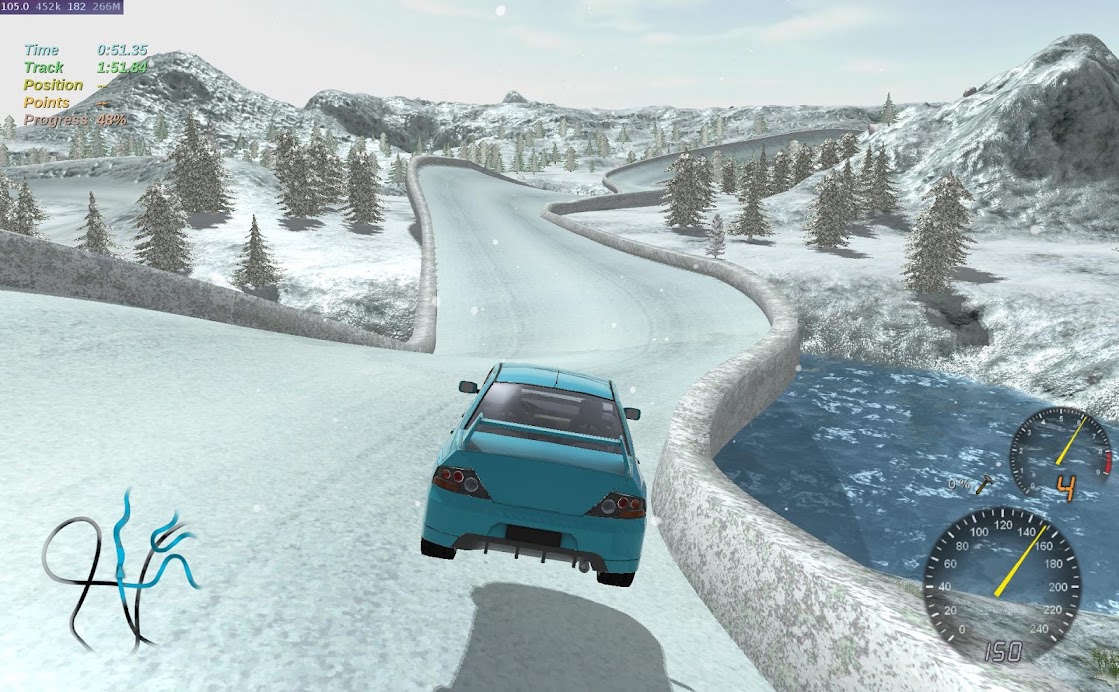
Open-Source Racing Game ‘Stunt Rally’ Sees Sizeable Update


Popular open-source racing game Stunt Rally has hit a new milestone with its recent 2.3 release — and not just in version numbers. 
All 153 tracks (7 of which are new to this release) have been ‘renewed’, according to the chief developer behind the game. This undertaking sees track terrain improved thanks to the introduction of larger, bolder and more vibrant textures and blend map noise. The addition of emissive light on select tracks should result in more realistic lighting
To help improve gameplay further, dynamic camera bouncing and camera angle sliders have also been introduced.
Stunt Rally’s lead developer demos a number of the new changes in the following video.

https://www.youtube.com/watch?v=s714RoTFF38


Stunt Rally sees racing take place on closed tracks with stunt elements such as jumps, loops and pipes. It offers both single player and online multiplayer modes.

Download Stunt Rally for Ubuntu

Want in? The latest release of the game can be downloaded for free from SourceForge. An older version is also available from Desura.


Hardware requirements ask for a dual-core CPU and a Nvidia GeForce 9600 GT or ATI Radeon HD 3870 graphics card (or equivalent) as minimum.


Source :http://www.omgubuntu.co.uk/

Intel Adds Ubuntu 14.04 Support to Linux Graphics Driver Installer

intelgraphicsdriverinstaller 


Intel’s handy GPU driver installer for Linux has been updated to support Ubuntu 14.04 LTS.
The tool aims to simplify both installation and updating of drivers for Intel’s graphics cards so that users are able to get the best performance out of their hardware and stay “up-to-date with the latest Intel Graphics Stack for Linux”.
But while Ubuntu 14.04 LTS 64-bit and 32-bit get the official nod, along with Fedora 20, the update sees support for earlier versions retired.
Those still sticking with the Saucy Salamander should be aware that Ubuntu 13.10 support has been deprecated as of this release. While the tool can still be used to install drivers on a deprecated release it won’t offer up the most recent graphics stack.
Accordingly, Ubuntu 13.04 (aka Raring Ringtail) moves from ‘deprecated’ status to ‘dropped’.
Intel “strongly encourages” users to make use of their tool on the latest supported releases. In this case, that’s Ubuntu 14.04 LTS.
Support changes aside there is little difference between 1.0.5 of the installation wizard and the version released in March.

Download Intel’s Driver Update Tool

The installer does not support the Ubuntu Linux low-latency kernel nor does it provide binary drivers for the Intel GMA 3600 (bundled with Intel’s Atom N2600 and N2800 chipsets).
Debian installers can be downloaded directly from the Intel Open Technology Centre website, linked below.


Source: http://www.omgubuntu.co.uk/

Friday, 21 March 2014

mengembalikan Grub yang ilang

mungkin saat install ulang windows.,.atau apalah yang menyebabkan grub kita ga kelihatan..:D
banyak cara yang bisa dilakukan untuk mengembalikan grub di linux,
singkat saja, berikut ini adalah cara yang sering saya gunakan untuk merenggut kembali grub loader yang hilang..heee....

booting melalui live CD,
truz buka terminal...

sudo fdisk -l

   Device Boot      Start         End      Blocks   Id  System
/dev/sda1               1        9726    78124063+   7  HPFS/NTFS
/dev/sda2   *       12159       21717    76782667+   7  HPFS/NTFS
/dev/sda3            9727       12158    19526753+   5  Extended
/dev/sda4           21718       30401    69754230   83  Linux
/dev/sda5            9728       10787     8514450   82  Linux swap / Solaris
/dev/sda6           10788       12158    11011072    7  HPFS/NTFS

Partition table entries are not in disk order


hiyaaa....partisi linux ada di /dev/sda4/
next :

sudo mount -t ext4 /dev/sda4 /mnt/
sudo mount -t proc proc /mnt/proc/
sudo mount -t sysfs sys /mnt/sys/
sudo mount -o bind /dev/ /mnt/dev/
sudo chroot /mnt /bin/bash

di sesuaikan peritah

sudo mount -t ext4 /dev/sda4 /mnt/  <<

dengan perintah2 yang sudah di ketik di atas,,dapat kita lihat hasilnya di terminal,,bahwa sebenarnya kita masuk ke dalam system linux yang ada di HD, namun yang kita ambil hanyalah terminalnya sajha (/bin/bash)

sekarang tinggal install ulang sajha grub nya :)

grub-install /dev/sda
grub-install /dev/sda4


Sumber :http://devirakhjib.blogspot.com/2011/05/renggut-kembali-grub-anda-d.html

menghapus file secara permanen di partisi

 dunia komputer semakin hari semakin berkembang, bahkan perkembangannya saat ini mengalami lonjakan yang sangat luar biasa..:)
kita tau ada berbagai media penyimpanan data di dalam dunia komputer,
mungkin yang paling familiar atau yang paling sering di gunakan adalah Hardisk,flashdisk,sd card..memory..disket..dll

nah..kebetulan pada saat linux camp beberapa hari yang lalu saya sempat di percaya untuk menyampaikan materi.
salah satu materi yang saya sampaikan yaitu me-recovery data pada hardisk yang sudah ter-format.
berawal dari situlah muncul tulisan sederhana ini..:)

pada sesi pertanyaan ada salah satu peserta yang menanyakan :
bagaimana mas cara menghapus file secara permanent yang ada di hardisk atau media lainnya???

oke..pada dasarnya apapun yang pernah ada dan tersimpan pada media penyimpanan itu tidaklah hilang meskipun kita
menghapusnya..saya mengutip statment salah satu ahli forensic yang ada di indonesia
beliau mengatakan bahwa "selama media itu tidak di bakar. maka data masih bisa di kembalikan"
statment yang sangat ilmiah menurut saya..:D, karena memang ilmu forensic mempelajari hal-hal semacam itu. hee..:)

pokok :

berikut saya akan jawab pertanyaan yang di ajukan tersebut. :)
dalam hal ini sistem operasi berbasis GNU/LINUX. ada banyak cara menghapus file dengan aman sebenarny

tools yang kita gunakan adalah shred. shred merupakan command atau utility yang sudah ada pada sistem operasi linux.

berikut cara menggunakannya..

Mandatory arguments to long options are mandatory for short options too.
  -f, --force    change permissions to allow writing if necessary
  -n, --iterations=N  overwrite N times instead of the default (3)
      --random-source=FILE  get random bytes from FILE
  -s, --size=N   shred this many bytes (suffixes like K, M, G accepted)
  -u, --remove   truncate and remove file after overwriting
  -v, --verbose  show progress
  -x, --exact    do not round file sizes up to the next full block;
                   this is the default for non-regular files
  -z, --zero     add a final overwrite with zeros to hide shredding
      --help     display this help and exit
      --version  output version information and exit

If FILE is -, shred standard output.

ini untuk menghapus file dengan aman :

Malang Cyber# shred file.txt file.rar file.mp4

ini menghapus seluruh atau memformat partisi :

Malang Cyber# shred --verbose /dev/sda6

saya melakukan penghapusan partisi yang ada pada /dev/sda6

setelah selesai partisi akan hilang..jangan panik...:), buka gparted dan format kembali..:)

insya allah data tidak akan terdeteksi lagi, meskipun di recovery..:)


Sumber: http://devirakhjib.blogspot.com/2012/03/menghapus-file-secara-permanen-di.html